Pixel Sort
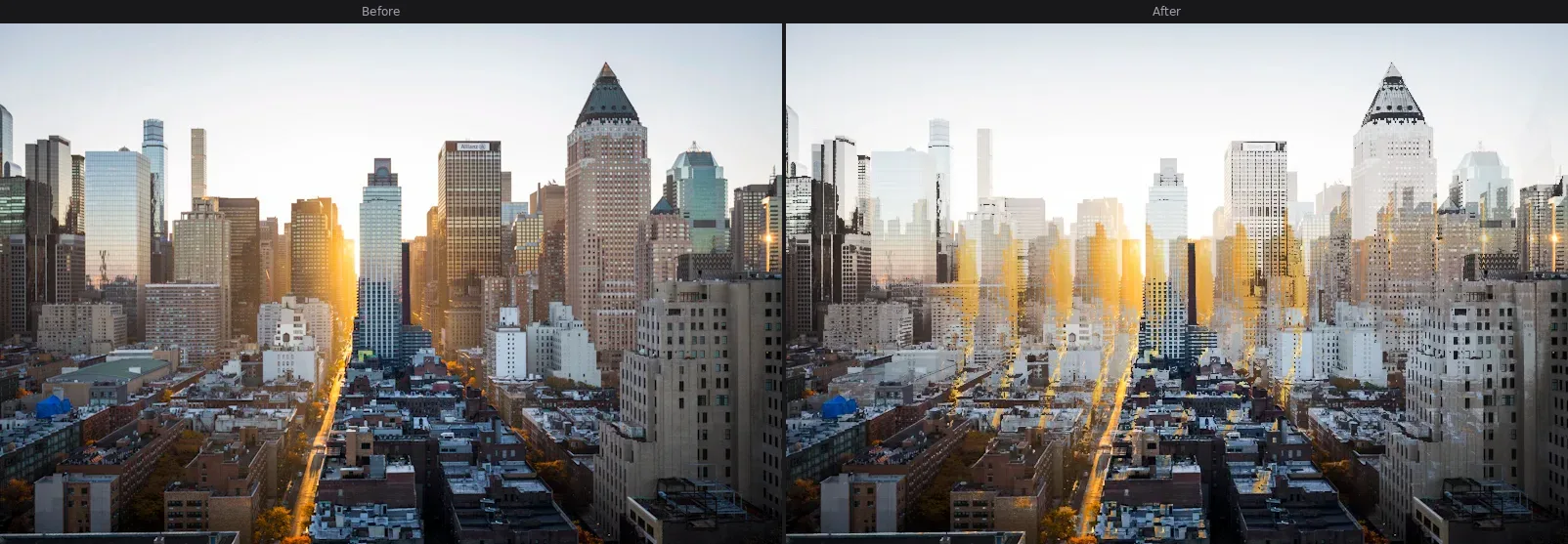
Sort image pixels by brightness to create surreal glitch streaks — a signature databending effect used in cyberpunk and vaporwave art.
About this effect
Pixel Sort is one of the most recognizable glitch art techniques. It scans each row or column of the image and reorders pixels by their brightness value, creating smooth gradient streaks where the original image used to be. The effect was popularized by databending experiments — deliberately corrupting image data to produce unexpected beauty.
With GlitchForge, you control the sort direction (horizontal, vertical, or both), intensity, and brightness threshold. A lower threshold sorts more of the image; a higher one preserves the original structure while letting streaks bleed through highlights. Stack it with RGB Shift and Scanlines for a complete cyberpunk look.
Parameters
- ▸Intensity — how far pixels travel during sorting
- ▸Direction — horizontal, vertical, or both
- ▸Threshold — brightness cutoff; lower = more sorting
Best for
Portraits, cityscapes, album covers, abstract backgrounds
Use cases
- ▸Cyberpunk character portraits
- ▸Album / single cover art
- ▸Social media header images
- ▸Poster backgrounds
Related effects
Try Pixel Sort and 18 other effects — free, no watermark.
Start Glitching