RGB Shift
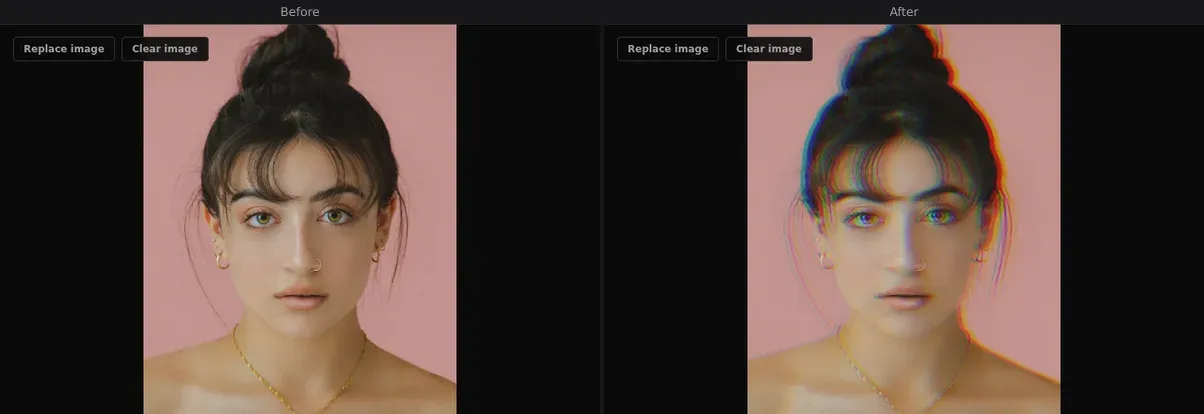
Displace the red and blue color channels separately to create a chromatic aberration glitch — the most iconic glitch art effect, used everywhere from music videos to movie posters.
About this effect
RGB Shift (also called Chromatic Aberration or Channel Shift) is the visual foundation of glitch art. By shifting the red and blue color channels in opposite directions while leaving green in place, you create that unmistakable 'smeared neon' look — as if the image is struggling to hold itself together.
GlitchForge gives you independent control over the red and blue offset amounts. Subtle shifts (2-8px) add a cinematic color fringe popular in film and photography. Aggressive shifts (20-40px) create bold, disorienting glitch effects that dominate music videos and electronic music artwork. Combine with Scanlines for a CRT monitor vibe.
Parameters
- ▸Red offset — how far the red channel shifts (px)
- ▸Blue offset — how far the blue channel shifts (px)
Best for
Portraits, neon signs, concert photos, urban night scenes
Use cases
- ▸Music video stills
- ▸Concert / event posters
- ▸Urban night photography
- ▸Band / artist press photos
Related effects
Try RGB Shift and 18 other effects — free, no watermark.
Start Glitching